
A garage built from your photos
Every car is a shot you took. Sort and filter by brand, series or year, group cars into collections and keep a wishlist of what you are still hunting.

Diecast collection app for iPhone and Android
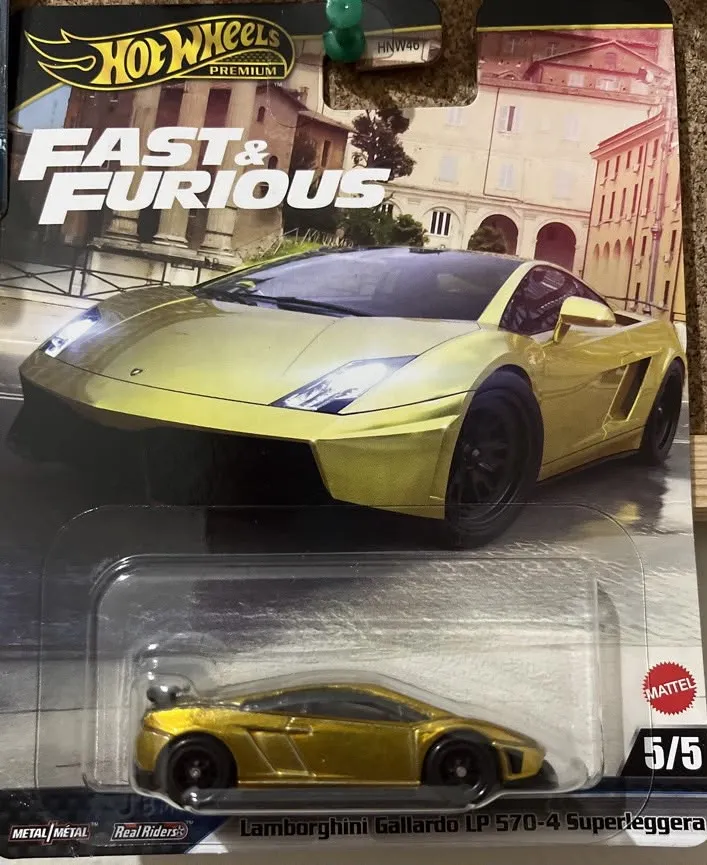
Photograph a Hot Wheels, Matchbox, Mini GT or any other model. Diecast Hub fills in the name, brand, series and year, and the car lands in your garage with your photo on it.
Diecast Hub is a free app for iPhone and Android that catalogs your diecast car collection. You photograph each car, the AI fills in its details, and it is saved to a garage that is yours.
It is not a checklist to tick off. Every car in Diecast Hub is shown with the photo its owner took, whether it is a peg find, a premium release, a 1:18 on the shelf or a custom you built yourself.
Adding a car takes one photo and one tap. No typing out casting names, no scrolling through lists.
Use your camera or pick a shot from your gallery. Carded or loose, both work.
The AI reads the photo and fills in the model name, brand, series, color and more.
Every field stays editable. Save, and the car is in your garage with your photo on it.
The AI can get a detail wrong, especially on rare variants. A second photo of the base or card back helps.
Your garage first. Then everything that makes collecting more fun.
Every car is a shot you took. Sort and filter by brand, series or year, group cars into collections and keep a wishlist of what you are still hunting.
Series, collector number, scale, color, condition, packaging and what you paid. Mark Treasure Hunts and other chase cars so they stand out.

Garage stats break your collection down by brand and series, count your Treasure Hunts and add up the value you have recorded.

Browse garages from collectors around the world, follow the ones you like and trade your duplicates. You choose which of your cars are public.

Enter your best shot every month, vote for your favorites and see who makes the podium.

Guess the Car, Memory Match and Parking Escape, with a leaderboard that starts fresh every week.

Diecast Hub works with every diecast brand from 1:64 to 1:18, loose or carded, customs included. These are the ones collectors add most.
Diecast Hub is free to download and use. Premium is there when your garage outgrows the free plan.
Everything you need to start a garage.
The free plan has no time limit. Upgrade only if you want more room.
For collections that keep growing.
Monthly and annual plans. Prices for your region are shown in the app. Subscriptions are billed and managed by Apple or Google.
Diecast Hub is a free app for iPhone and Android that catalogs a diecast car collection. You photograph each car, the AI fills in its name, brand, series, scale, color and year, and the car is saved to your personal garage. It works with Hot Wheels, Matchbox, Mini GT and every other brand.
Yes. In Diecast Hub you take or pick a photo of a car, carded or loose, and tap Analyze with AI. The app fills in the model name, brand, series, color, scale, model year, release year and collector number. The AI can get a detail wrong, so every field stays editable before you save.
Diecast Hub is free to download and use. The free plan holds up to 30 cars and one collection, includes a limited number of AI scans and shows ads. Premium is an optional subscription that removes the limits and the ads and adds up to four photos per car, reports and Excel export.
Any brand and any scale. Collectors use Diecast Hub for Hot Wheels, Matchbox, Mini GT, Greenlight, Johnny Lightning, M2 Machines, Auto World, Tomica, Maisto and many others, from 1:64 to 1:18. Customs and loose cars work too, because every entry starts from your own photo.
A checklist app starts from a catalog and asks you to tick boxes. Diecast Hub starts from your shelf: you photograph the cars you own and the AI fills in the details. Your garage shows your photos, your notes and your variants, including customs that no catalog lists.
Yes. In Diecast Hub you can mark any car as a Treasure Hunt, a Super Treasure Hunt or another brand’s chase piece. Chase cars are counted in your garage stats, so you can see how many you have found.
Only what you choose to share. Each car in Diecast Hub can be public or private, and your profile can be set to private. Public cars can appear in Explore, where other collectors can like them and follow you.
Your collection is stored in your Diecast Hub account, so it is there when you sign in on another phone. Premium adds Excel export of the full collection.
Diecast Hub is available in English, Turkish, German, French, Spanish and Japanese.
Diecast Hub is developed by HegionSoft, an independent developer. It is not affiliated with, sponsored by or endorsed by Mattel, Hot Wheels, Matchbox or any other brand. You can reach the team at info@hegionsoft.com.
Facts on this page were last checked on . More help on the support page.
Your collection. Your photos. Free on iPhone and Android.